> ## Documentation Index
> Fetch the complete documentation index at: https://docs.aihive.global/llms.txt
> Use this file to discover all available pages before exploring further.

# Developers

> Developers - AI Hive Documentation

# Tài liệu cho Lập trình viên (Developers & API)

AIHive cung cấp bộ công cụ mạnh mẽ (API & SDK) giúp bạn tích hợp trí tuệ nhân tạo vào website, ứng dụng di động hoặc hệ thống quản trị nội bộ (ERP/CRM) một cách nhanh chóng.

***

## Tích hợp Chat Widget (Web SDK)

Đây là giải pháp "mì ăn liền" (No-code) giúp bạn đưa AIHive lên website chỉ với một đoạn mã HTML đơn giản.

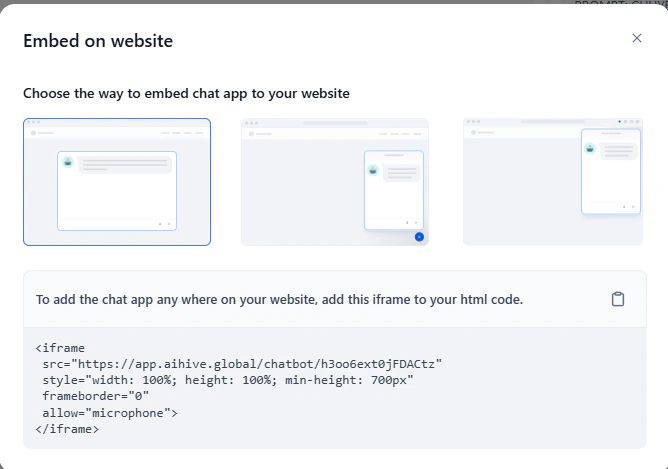
Đầu tiên hãy vào giao diện **“Thiết lập AI”**, sau khi thiết lập hoàn tất. Nhấn **“Xuất bản”**

<img src="https://mintcdn.com/nhatvk/DVLDCi-NhXS0bs-l/images/developers/developers-5d3f76a4.png?fit=max&auto=format&n=DVLDCi-NhXS0bs-l&q=85&s=4578bf50f7caab153f886893fddc03de" alt="image.png" width="668" height="469" data-path="images/developers/developers-5d3f76a4.png" />

### Cách 1: Nút Chat nổi (Floating Bubble)

Hiển thị biểu tượng chat ở góc màn hình. Phù hợp cho Landing Page hoặc trang chủ.

Copy đoạn mã sau và dán vào thẻ `<body>` hoặc `<footer>` của website:

```html theme={null}
<script>
 window.difyChatbotConfig = \{
  token: 'YOUR_TOKEN_HERE', // Thay bằng Token lấy trong trang cấu hình Agent
  baseUrl: '[<https://api.aihive.global>](<https://api.aihive.global>)'
 \}
</script>
<script
 src="[<https://api.aihive.global/embed.min.js>](<https://api.aihive.global/embed.min.js>)"
 id="YOUR_TOKEN_HERE"
 defer>
</script>
```

### Cách 2: Nhúng toàn màn hình (Full Page)

Biến một trang web con thành giao diện chat AI chuyên biệt (giống giao diện ChatGPT).

Dán đoạn mã sau vào thẻ `<body>`:

```html theme={null}
<style>
 /* Ẩn nút bấm, ép khung chat full màn hình */
 #dify-chatbot-bubble-button \{
  display: none;
 \}
 #dify-chatbot-bubble-window \{
  width: 100% !important;
  height: 100% !important;
  bottom: 0 !important;
  right: 0 !important;
 \}
</style>

<script>
 window.difyChatbotConfig = \{
  token: 'YOUR_TOKEN_HERE',
  baseUrl: '[<https://api.aihive.global>](<https://api.aihive.global>)'
 \}
</script>
<script
 src="[<https://api.aihive.global/embed.min.js>](<https://api.aihive.global/embed.min.js>)"
 id="YOUR_TOKEN_HERE"
 defer>
</script>
```

### Cách 3: Nhúng iFrame (Khung chat cố định)

Chèn khung chat vào một vị trí cố định trong bài viết hoặc giao diện dashboard quản trị.

```html theme={null}
<iframe
 src="[<https://app.AIHive.com/chatbot/YOUR_TOKEN_HERE>](<https://app.aihive.globalchatbot/YOUR_TOKEN_HERE>)"
 style="width: 100%; height: 600px; border: none; border-radius: 10px;">
</iframe>
```

## Chat API (Backend Integration)

Sử dụng API này để xây dựng giao diện chat tùy chỉnh (Custom UI) trên Mobile App hoặc gửi/nhận tin nhắn từ Server của bạn.

### 1. Thông tin kết nối

* **Base URL:** `https://api.aihive.global/v1`
* **Endpoint:** `/chat-messages`
* **Method:** `POST`

### 2. Xác thực (Authentication)

Vào giao diện thiết lập Agent nhấn “Xuất bản” và copy đoạn API Key ở đây

<img src="https://mintcdn.com/nhatvk/DVLDCi-NhXS0bs-l/images/developers/developers-142f9bfa.png?fit=max&auto=format&n=DVLDCi-NhXS0bs-l&q=85&s=50a942577a0cfb0f282357591f553dc3" alt="e5f16786-9736-4fa0-bbb1-9b4defff81dc.png" width="1926" height="1086" data-path="images/developers/developers-142f9bfa.png" />

### 2. Xác thực (Authentication)

Mọi request đều phải kèm theo Header xác thực để bảo mật:

```html theme={null}
Authorization: Bearer app-xxxxxxxxxxxxxxxxxxxxxxxx
Content-Type: application/json
```

### 3.Body Parameters (Dữ liệu gửi đi)

| **Tham số**                                    | **Kiểu dữ liệu** | **Bắt buộc** | **Mô tả**                                                                                            |
| ---------------------------------------------- | ---------------- | ------------ | ---------------------------------------------------------------------------------------------------- |
| **inputs**                                     | Object           | ✅            | Các biến đầu vào (Ví dụ: tên, tuổi). Để trống `\{\}` nếu không dùng.                                 |
| **query**                                      | String           | ✅            | Nội dung tin nhắn của người dùng (Ví dụ: "Xin chào").                                                |
| **response\_mode**                             | String           | ✅            | `blocking`: Chờ trả về kết quả 1 lần (Khuyên dùng).                                                  |
| `streaming`: Trả về từng từ (hiệu ứng gõ chữ). |                  |              |                                                                                                      |
| **conversation\_id**                           | String           | ❌            | ID cuộc hội thoại. Để trống `""` ở tin nhắn đầu tiên. Các tin sau gửi lại ID cũ để Bot nhớ ngữ cảnh. |
| **user**                                       | String           | ✅            | ID định danh người dùng duy nhất (Ví dụ: `user-123`).                                                |

### 4. Ví dụ Request (cURL)

Bạn có thể test nhanh kết nối bằng Terminal:

```bash theme={null}
curl -X POST '[<https://api.aihive.global/v1/chat-messages>](<https://api.aihive.global/v1/chat-messages>)' \\
--header 'Authorization: Bearer app-xxxxxxxxxxxxxxxxxxxxxxxx' \\
--header 'Content-Type: application/json' \\
--data-raw '\{
    "inputs": \{\},
    "query": "Tư vấn cho tôi về sản phẩm",
    "response_mode": "blocking",
    "conversation_id": "",
    "user": "khach-hang-01"
\}'
```

### 5. Ví dụ Response (Kết quả trả về)

Nếu gọi thành công, Server sẽ trả về JSON chứa câu trả lời của AI:

```json theme={null}
\{
    "event": "message",
    "message_id": "99f074xx-xxxx-xxxx",
    "conversation_id": "88e912xx-xxxx-xxxx",
    "mode": "chat",
    "answer": "Chào bạn, AIHive có thể giúp gì cho bạn hôm nay?",
    "metadata": \{
        "usage": \{
            "prompt_tokens": 50,
            "completion_tokens": 20,
            "total_tokens": 70
        \}
    \},
    "created_at": 1705634000
\}
```

## Xử lý lỗi (Error Handling)

| **Mã lỗi (HTTP Code)**    | **Nguyên nhân**       | **Cách khắc phục**                                                   |
| ------------------------- | --------------------- | -------------------------------------------------------------------- |
| **401 Unauthorized**      | Sai API Key.          | Kiểm tra lại Header `Authorization` xem đã đúng key chưa.            |
| **402 Payment Required**  | Hết hạn mức gói cước. | Nạp tiền hoặc nâng cấp gói AIHive.                                   |
| **404 Not Found**         | Sai đường dẫn API.    | Kiểm tra lại Base URL xem có đúng `https://api.aihive.global` không. |
| **429 Too Many Requests** | Gửi quá nhanh (Spam). | Giới hạn tốc độ gửi tin hoặc liên hệ nâng cấp.                       |