> ## Documentation Index
> Fetch the complete documentation index at: https://docs.aihive.global/llms.txt
> Use this file to discover all available pages before exploring further.
# Workspace Management
> Workspace Management - AI Hive Documentation
# Member Management & Permissions
To operate the AI system effectively, AIHive allows you to invite colleagues to join your Workspace with different roles and permissions, ensuring security and specialization.
***
## Inviting New Members
To add personnel to the system, follow these steps:
### Step 1: Access the Management Page
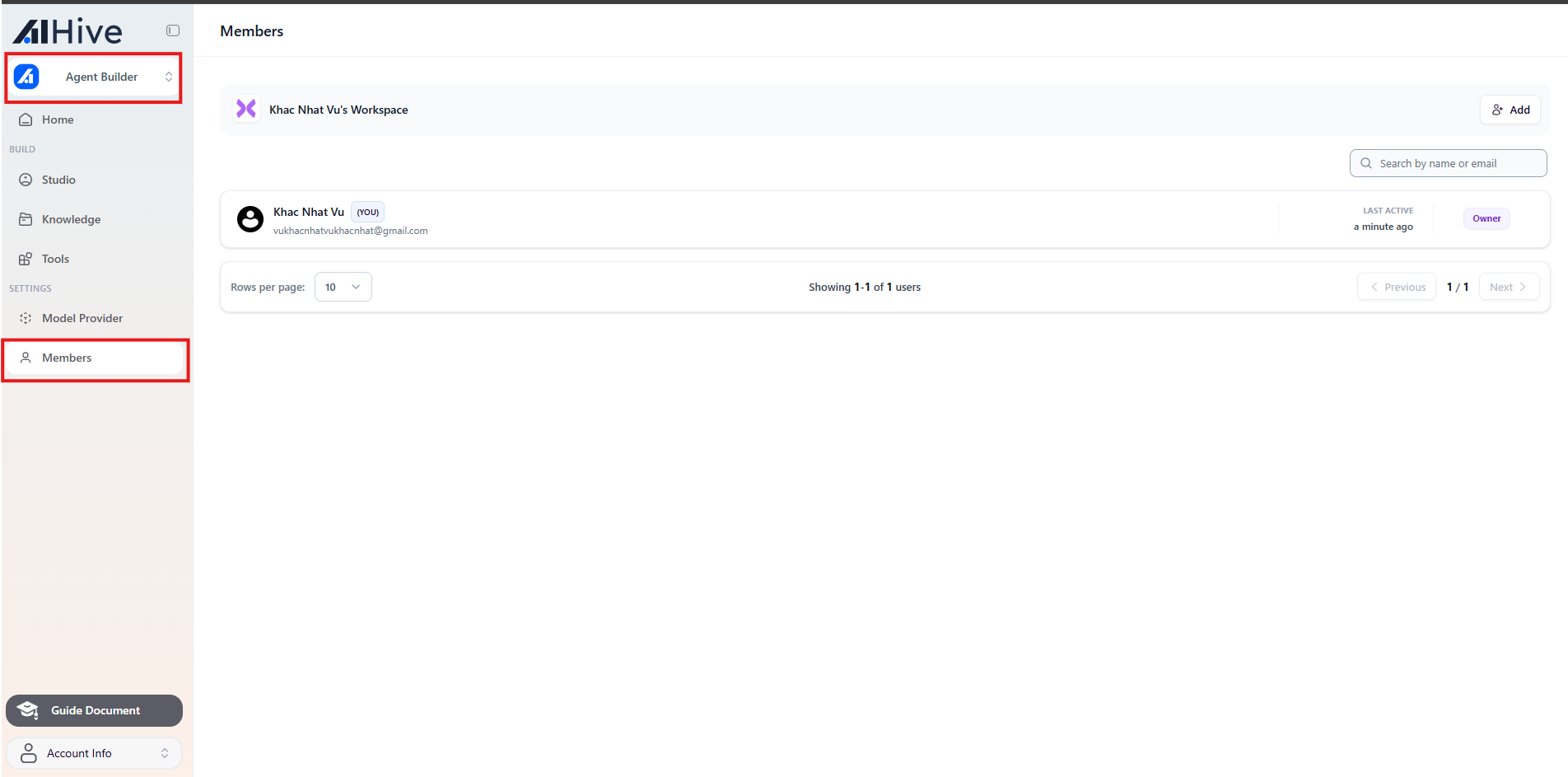
1. On the main interface of **Builder** mode, click on **Members** in the left sidebar.
 ### Step 2: Send an Invitation
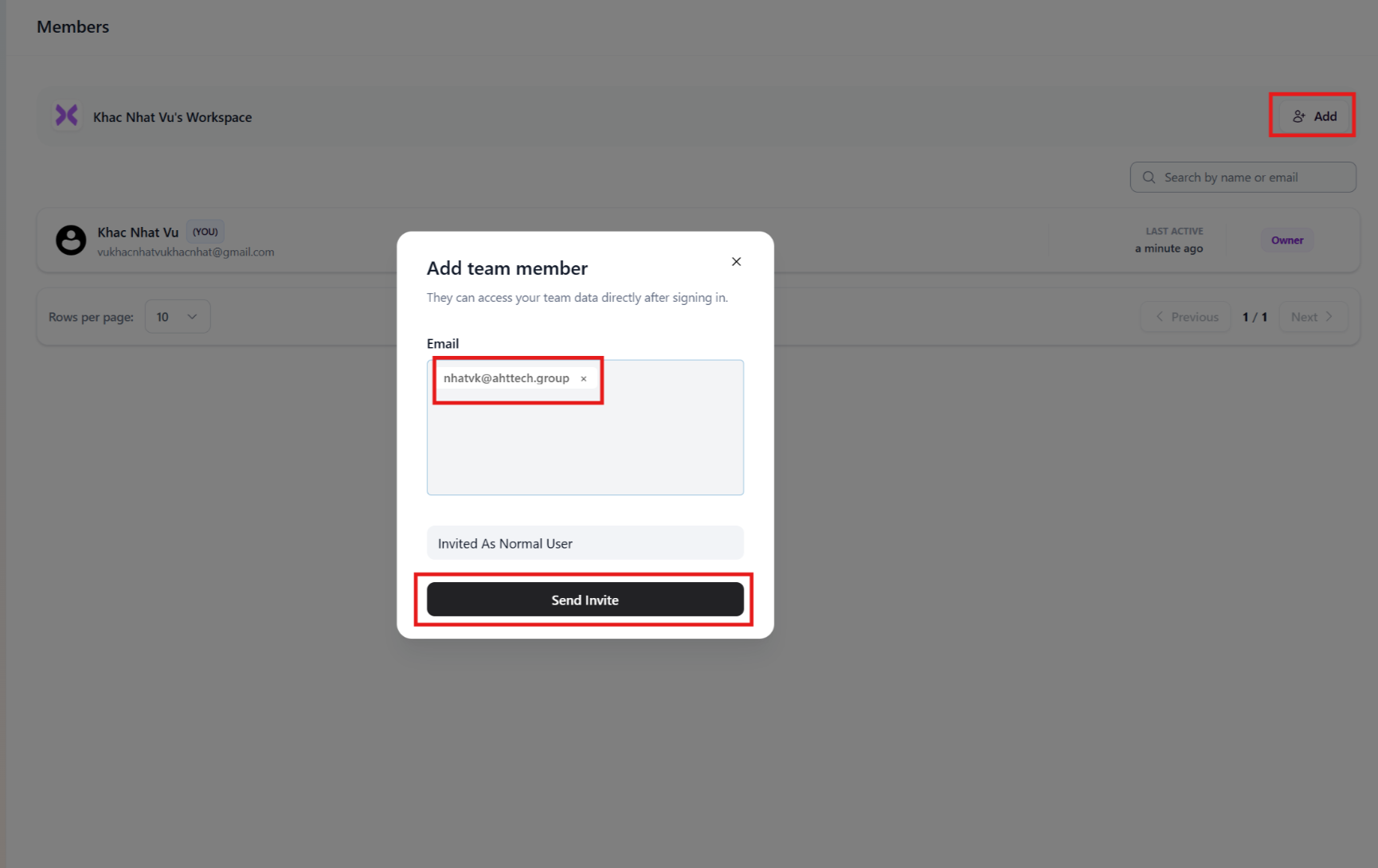
1. Click the **+ Invite Member** button in the top right corner.
2. Enter the **Email** of the person you want to invite.
3. **Important:** Select the appropriate **Role** for them (See detailed role descriptions in Section 2).
4. Click **Send**.
### Step 2: Send an Invitation
1. Click the **+ Invite Member** button in the top right corner.
2. Enter the **Email** of the person you want to invite.
3. **Important:** Select the appropriate **Role** for them (See detailed role descriptions in Section 2).
4. Click **Send**.
 ***
## Roles & Permissions Explained
AIHive divides permissions strictly to ensure data security. Below is the detailed permission table:
| Role | Permissions & Description | Suitable For |
| ------------------- | -------------------------------------------------------------------------------------------------------------------------------------------------------------------------------------------------- | --------------------------------------------- |
| **Owner** | **Full control:**
***
## Roles & Permissions Explained
AIHive divides permissions strictly to ensure data security. Below is the detailed permission table:
| Role | Permissions & Description | Suitable For |
| ------------------- | -------------------------------------------------------------------------------------------------------------------------------------------------------------------------------------------------- | --------------------------------------------- |
| **Owner** | **Full control:**
• Manage billing.
• Delete Workspace.
• Manage all Agents and Members.
• Cannot be removed from the system. | Director, Business Owner, Account Creator. |
| **Admin** | **Operational management:**
• Create/Edit/Delete Agents.
• Invite or remove members (except Owner).
• View all reports and chat history.
❌ Cannot access billing/subscription. | Technical Lead, Customer Service Team Leader. |
| **Editor** | **Bot building:**
• Configure Prompt, Flow, Knowledge.
• Edit Agents.
❌ Cannot delete Agents, invite members, or view system configuration. | Technical Staff, Content Creator, AI Trainer. |
| **Normal / Viewer** | **Basic usage:**
• Can only view and test chat with Bot.
• View chat logs (if permitted).
❌ Cannot view Prompts or edit configuration. | Customer Service Staff, Tester, Intern. |
 ***
## Managing Existing Members
You can change permissions or remove members at any time.
### Change Role
1. In the member list, find the person you want to modify.
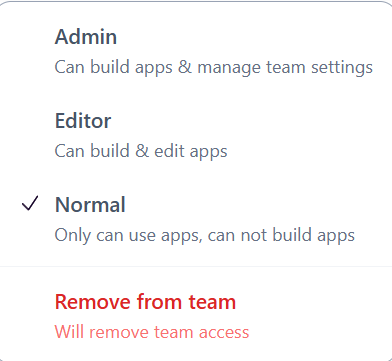
2. Click on their current role (e.g., *Editor*).
3. Select the new role from the dropdown. The system will save automatically.
### Remove Member
1. Click the **Trash** icon (or three dots -> Remove) at the end of the member's row.
2. Confirm removal.
> Note: After removal, that person will lose access immediately. Agents created by them will remain in the Workspace.
***
## Managing Existing Members
You can change permissions or remove members at any time.
### Change Role
1. In the member list, find the person you want to modify.
2. Click on their current role (e.g., *Editor*).
3. Select the new role from the dropdown. The system will save automatically.
### Remove Member
1. Click the **Trash** icon (or three dots -> Remove) at the end of the member's row.
2. Confirm removal.
> Note: After removal, that person will lose access immediately. Agents created by them will remain in the Workspace.
