> ## Documentation Index
> Fetch the complete documentation index at: https://docs.aihive.global/llms.txt
> Use this file to discover all available pages before exploring further.

# Developers 

> Developers  - AI Hive Documentation

# Developer Documentation (Developers & API)

AIHive provides a powerful toolkit (API & SDK) to help you integrate artificial intelligence into your website, mobile app, or internal management system (ERP/CRM) quickly.

***

## Chat Widget Integration (Web SDK)

This is an "instant" solution (No-code) that allows you to add AIHive to your website with just a simple HTML code snippet.

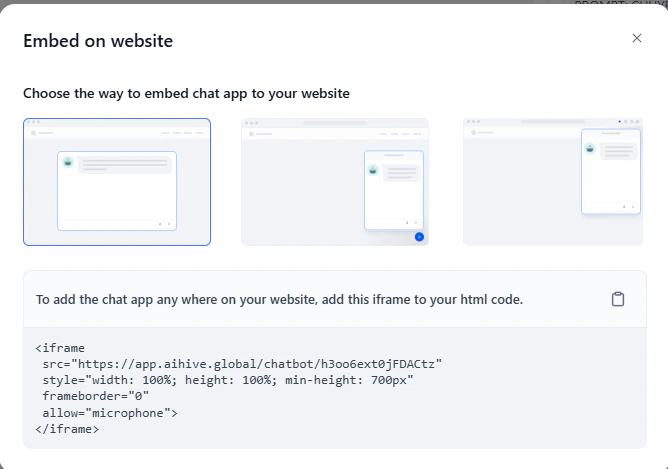
First, go to the **"AI Setup"** interface, after completing the setup. Click **"Publish"**

<img src="https://mintcdn.com/nhatvk/DVLDCi-NhXS0bs-l/images/developers/developers-8bd3f37d.png?fit=max&auto=format&n=DVLDCi-NhXS0bs-l&q=85&s=d9d7329162c287e8b24a16d353ba1d7b" alt="image.png" width="668" height="469" data-path="images/developers/developers-8bd3f37d.png" />

### Method 1: Floating Chat Bubble

Displays a chat icon in the corner of the screen. Suitable for Landing Pages or homepages.

Copy the following code and paste it into the `<body>` or `<footer>` tag of your website:

```html theme={null}
<script>
 window.difyChatbotConfig = \{
  token: 'YOUR_TOKEN_HERE', // Replace with the Token from the Agent configuration page
  baseUrl: '[<
https://api.aihive.global>](<https://api.aihive.global
>)'
 \}
</script>
<script
 src="[<
https://api.aihive.global/embed.min.js>](<https://api.aihive.global/embed.min.js
>)"
 id="YOUR_TOKEN_HERE"
 defer>
</script>
```

### Method 2: Full Page Embed

Transform a sub-page into a dedicated AI chat interface (similar to ChatGPT interface).

Paste the following code into the `<body>` tag:

```html theme={null}
<style>
 /* Hide button, force chat frame to full screen */
 #dify-chatbot-bubble-button \{
  display: none;
 \}
 #dify-chatbot-bubble-window \{
  width: 100% !important;
  height: 100% !important;
  bottom: 0 !important;
  right: 0 !important;
 \}
</style>

<script>
 window.difyChatbotConfig = \{
  token: 'YOUR_TOKEN_HERE',
  baseUrl: '[<
https://api.aihive.global>](<https://api.aihive.global
>)'
 \}
</script>
<script
 src="[<
https://api.aihive.global/embed.min.js>](<https://api.aihive.global/embed.min.js
>)"
 id="YOUR_TOKEN_HERE"
 defer>
</script>
```

### Method 3: iFrame Embed (Fixed Chat Frame)

Embed a chat frame in a fixed position within an article or admin dashboard interface.

```html theme={null}
<iframe
 src="[<https://app.aihive.global/chatbot/YOUR_TOKEN_HERE>](<https://app.aihive.global/chatbot/YOUR_TOKEN_HERE>)"
 style="width: 100%; height: 600px; border: none; border-radius: 10px;">
</iframe>
```

## Chat API (Backend Integration)

Use this API to build a custom chat interface (Custom UI) on Mobile App or send/receive messages from your Server.

### 1. Connection Information

* **Base URL:** `https://api.aihive.global/v1`
* **Endpoint:** `/chat-messages`
* **Method:** `POST`

### 2. Authentication

Go to the Agent setup interface, click "Publish" and copy the API Key here

<img src="https://mintcdn.com/nhatvk/DVLDCi-NhXS0bs-l/images/developers/developers-1a4b42f6.png?fit=max&auto=format&n=DVLDCi-NhXS0bs-l&q=85&s=cea2c9053d53916aa428bbe9eaedd611" alt="image.png" width="2469" height="1393" data-path="images/developers/developers-1a4b42f6.png" />

### 2. Authentication

All requests must include an authentication Header for security:

```html theme={null}
Authorization: Bearer app-xxxxxxxxxxxxxxxxxxxxxxxx
Content-Type: application/json
```

### 3. Body Parameters (Data to Send)

| **Parameter**                                     | **Data Type** | **Required** | **Description**                                                                                                                |
| ------------------------------------------------- | ------------- | ------------ | ------------------------------------------------------------------------------------------------------------------------------ |
| **inputs**                                        | Object        | ✅            | Input variables (e.g., name, age). Leave empty `\{\}` if not used.                                                             |
| **query**                                         | String        | ✅            | User's message content (e.g., "Hello").                                                                                        |
| **response\_mode**                                | String        | ✅            | `blocking`: Wait and return result at once (Recommended).                                                                      |
| `streaming`: Return word by word (typing effect). |               |              |                                                                                                                                |
| **conversation\_id**                              | String        | ❌            | Conversation ID. Leave empty `""` for the first message. Send the old ID for subsequent messages so the Bot remembers context. |
| **user**                                          | String        | ✅            | Unique user identifier (e.g., `user-123`).                                                                                     |

### 4. Request Example (cURL)

You can quickly test the connection using Terminal:

```bash theme={null}
curl -X POST '[<
https://api.aihive.global/v1/chat-messages>](<https://api.aihive.global/v1/chat-messages
>)' \\
--header 'Authorization: Bearer app-xxxxxxxxxxxxxxxxxxxxxxxx' \\
--header 'Content-Type: application/json' \\
--data-raw '\{
    "inputs": \{\},
    "query": "Advise me about products",
    "response_mode": "blocking",
    "conversation_id": "",
    "user": "customer-01"
\}'
```

### 5. Response Example (Returned Result)

If the call is successful, the Server will return JSON containing the AI's answer:

```json theme={null}
\{
    "event": "message",
    "message_id": "99f074xx-xxxx-xxxx",
    "conversation_id": "88e912xx-xxxx-xxxx",
    "mode": "chat",
    "answer": "Hello, how can AIHive help you today?",
    "metadata": \{
        "usage": \{
            "prompt_tokens": 50,
            "completion_tokens": 20,
            "total_tokens": 70
        \}
    \},
    "created_at": 1705634000
\}
```

## Error Handling

| **Error Code (HTTP Code)** | **Cause**                | **Solution**                                                                                |
| -------------------------- | ------------------------ | ------------------------------------------------------------------------------------------- |
| **401 Unauthorized**       | Wrong API Key.           | Check the `Authorization` Header to see if the key is correct.                              |
| **402 Payment Required**   | Plan quota expired.      | Top up or upgrade your AIHive plan.                                                         |
| **404 Not Found**          | Wrong API path.          | Check if the Base URL is correct: [`https://api.aihive.global`](https://api.oriagent.com/). |
| **429 Too Many Requests**  | Sending too fast (Spam). | Limit message sending rate or contact to upgrade your limit.                                |